In order to use Axebow effectively, it is crucial to grasp its fundamental concepts and underlying principles. These concepts serve as the bedrock upon which all functionalities, interactions, and operations are built.
Familiarize yourself with these basics to enhance your proficiency in using the platform but also gain a deeper insight into its capabilities and potential applications.
This section aims to provide a clear and concise overview of these foundational platform concepts, empowering users to leverage its features with confidence and efficacy.
1 Infrastructure Model
Internally, we organize the data about the infrastructure in a hierarchical way:
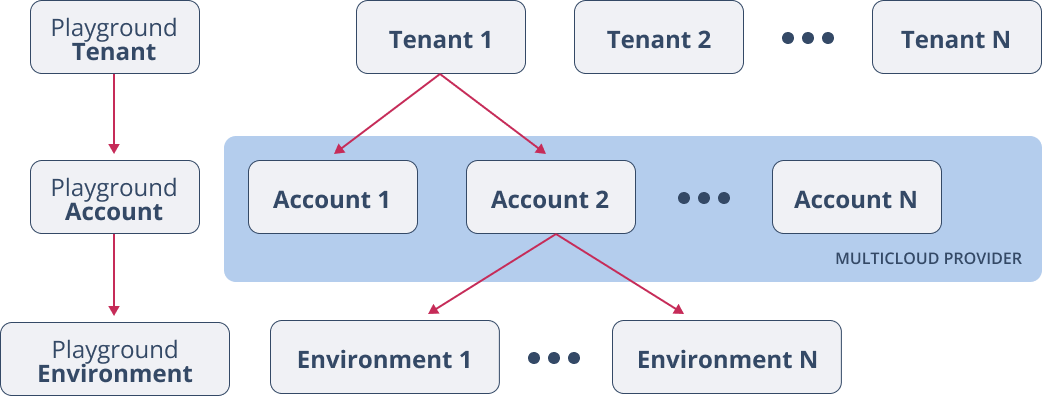
At the top we have Tenants. Tenants have owners. Owners are users that have that role within a tenant (see Section 3)
1.1 Users and organizations
Users must be registered on Axeow in order to interact with it. A user may represent an organization or it may just be registered on its own. In the next sections we will use the terms user and organization interchangeably.
Users may interact with Axebow either using the Playground tenant (a shared infrastructure provided by Axebow to try the platform), or subscribing to one of the plans made available by Kumori Systems on the Axebow Platform.
In order to do any useful work, users must subscribe to a plan, and create one or more tenants. Once a user creates a tenant it becomes its owner.
1.2 Tenant
The platform makes no assumptions about the purpose of a tenant. It is up to the owners of the tenant to actually decide how it is going to be used.
For instance when an organization has several geographical areas, tenants may be used to represent such areas. Similarly, tenants may be used to represent different business units.
Inside each Tenant, its users can manage Accounts. In turn, within each account, multiple Deployment Environments can be set up.
There is a special tenant created for each user that we refer to as the Playground tenant. The owner of this tenant is Kumori itself, as it is provided by Kumori as a sandbox for trying out the platform.
Each registered user gets one such tenant. In this tenant a user can deploy applications and integrate any third-party resources needed, free of charge.
Each user’s playground is limited to 2 vCPUs and 4 GB RAM, That is, a user can deploy a set of microservices whose total resource consumption doesn’t exceed 2 vCPUs and 4 GB RAM.
The Playground tenant is a sandbox for trying the platform, all the deployed services are deleted daily.
All activity in the platform happens under the scope of a tenant. It is within tenants that roles of users are defined.
1.2.1 Users Subscription Plans and tenants
Users can create tenants. Whenever a tenant is created, the user creating it becomest its owner.
Every tenant in the platform MUST be associated to ONE subscription plan. A Subscription Plan is a set of restrictions placed on the set of tenants assigned to it. Typical restrictions applied in the current version of Axebow affect total amounts of vCPU and memory usage of services deployed within the set of tenants under the plan.
Currently, Axebow offers two subscription plans: Freemium and Premium. Eavery plan on the platform is associated with a registered user (its owner). The same user can subscribe multiple premium plans, but only one freemium plan.
The Freemium plan places limits on vCPU and Memory usage and can be used for testing on the user’s own provided infrastructure (the playground, besides having lower consumption limits, uses a shared infrastructure provided by Kumori). Each user can create only one subscription plan. This plan does not require the user to provide any payment method as Axebow places no charges on its usage.
The Premium plan, on the other hand, poses no limits on vCPU or memory conumption, but requires the user subscribing it to provide a credit card to charge for the platform usage. The usage is measured in vCPU/hour of the deployed services on all tenants assigned to a plan.
When a tenant is created, the user creating it must assign it to one of the subscription plans the user owns. The tenant can later on be moved to any other plan owned by one of the tenant’s owners (that owner must perform the action)
Moving a tenant to a plan will be blocked if scuh movement would violate the limits of the destination plan.
1.3 Account
An account identifies and gives access to an IaaS provider, configuring the credentials (tokens) needed to on the IaaS provider to allocate/deallocate IaaS resources.
An account is also used to establish various limits on expenditures of resources, as well as to establish the characteristics of the various resources provided by the target IaaS (which machine flavors to use, or what storage flavors to employ)
1.4 Environment
An Environment is a logical division of the computational resources available through an account.
Services being deployed on Axebow are deployed to environments, where each environment ends up representing a cluster under the IaaS provider of the environment’s account. Clusters associated to environments run the Kumori Service Execution Platform, and are referred to as KClusters. Services deployed on Axebow are ultimately running on KClusters.
Each environment controls at most one KCluster. Axebow does not instantiate KClusters until users deploy services that target its controlling environment.
If a KCluster has been created to deploy a service which is later on undeployed, it is possible to release the KCluster and avoid runnig unnecessary IaaS costs.
1.5 Infrastructure Costs
Infrastructure costs refer to the expenses associated with using the IaaS provider infrastructure in which the deployment environments are setup.
IaaS infrastructure is subscribed to entirely by Axebow users. Axebow in no way intermediates with it. Axebow, however, can and will provide users with information about infreastructure expenditures incurred through Axebow (part of a future update of Axebow)
1.6 Label
Labels are key-value pairs that can be used on Axebow to group related resources.
Examples:
- You can use labels to group Environments in categories such as production, staging, or development so that you can filter the resources that belong to each development stage.
- Use the labels to group Environments in categories such as azure, aws, google, or ovh so that you can filter the resources that belong to each cloud provider.
- Labels allow to group Environments in categories like process-A, process-B, or process-C so that you can filter the resources that belong to each end-to-end process.
1.7 Limits
A limit sets the maximum number of resources an Account or an Environment could consume. There are two kinds of limits that can be configured, namely soft and hard.
Tenant Limits set the maximum total accumulated number of intensive resources (vCPU, memory) that its Accounts can consume. The addition of all resources consumed in all Tenant Accounts cannot over exceed Tenant Limits.
Account Limits set the maximum total accumulated number of resources that its Environments can consume. The addition of all resources consumed in all Account Environments cannot over exceed Account Limits.
Environment Limits set the maximum resources can be consumed by services deployed within it.
There are four types of limits:
- Intensive
-
- CPU
- Memory
- Scaleout
-
- Storage
- IaaS Resources
2 Kumori PaaS concepts
As mentioned above, services deployable on Axebow are going to be run on the Kumori Service Execution Platform.
In what follows we mention the salient concepts in that platform.
2.1 Service
In simple terms, a service is a (potentially stateful) execution of a program.
In our model, services can be formed by running multiple microservices interconnected among them, following the designed deployment architecture of the server (describing the intercommunication patterns among those microservices).
When a service is first activated, one of the problems that needs to be solved is ensuring each one of the microservices can find those microservices with whom it needs to communicate. This is often referred to as service discovery. Service discovery is mediated on KClusters using a very simple DNS mechanism, fed via dependency injection carried out by the KCluster, informed by the definition provided using Kumori’s model.
2.2 Artifacts
In a nutshell, a Kumori Artifact is the specification of how to obtain a Service (this includes microservices).
The Kumori platform considers two types of artifacts:
- Components
- Service Applications, that can specify more complex services, composed of many microservices with coupled life cycles.
2.2.1 Common aspects of Artifacts
Both component and service applications share commonalities pertaining to the fact that they both can be deployed as services. We refer to such commonalities as the interface of the artifact.
The interface of an artifact defines channels and configuration settings.
2.2.1.1 Client Channel
A client channel represents a dependency on some other service. The channel name can be dns resolved to communicate with whatever service is used to satisfy the dependency.
The service attached to a client channel may be one of the microservices deployed within the whole service, or it may be an independent service linked later on. Either case, code using the client channel cannot distinguish which is which, so that it is independent of who satisfies that dependency.
2.2.1.2 Server Channel
A server channel represents a functionality provided by the artifact through a communication endpoint.
2.2.1.3 Configuration settings
When deploying an artifact it is typically necessary to provide it with specific data for the deployment, and, potentially secondary storage and other elements that must be controlled by the environment where the artifact is being deployed (storage, domains, secrets,…).
Definitions of artifacts can specify the schema the data they need must follow. On deployment, it can be verified that the data provided fits the defined schema.
Likewise, definitions of artifacts can also include the specification of what environment dependent resources they will need on deployment. In the Kumori model we support the following environment-dependent resource types:
- Volumes
- Volatile
- Non-replicated
- Persistent
- Secrets
- Certificates
- Secret strings
- Controlled resources
- Domains
- Port numbers
These resource types can be registered within the environmet where an artifact is deployed. The registration must carry with it a registration name. The registration name is then used to configure the artifact deployment.
2.2.2 Components
A Component is just a program that can be autonomously run within its own environment.
When ran, such a program becomes a service. Components can run as part of larger services, fullfilling some role, potentially being replicated within that role, becoming what is generally referred to as a microservice.
Replication makes sense when we need to scale up to accomodate higher loads, or simply we need to create a highly available microservice, resilient to failures.
Besides server and client channels, components can also declare duplex channels, that combine the functionality of client and server channels and are typically needed to specify stateful replicated services.
2.2.3 Service Applications
Service applications allow the specification of more complex services.
Kumori’s service model lets service application authors to specify the following aspects of the service’s architecture:
- The set of artifacts composing the service application. They can be either components or other service applications.
- How the deployment configuration of the service application is spread to each one of the composing artifacts to form, in turn, their deployment configuration.
- How the different component artifacts depend on each other when deployed.
2.2.3.1 Role
Within a service application, artifacts are encapsulated within a structure we refer to as a role. A role provides a specification on how to deploy the artifact it refers to. Such specification determines how the service application declared configuration is to be transformed into the role’s artifact configuration specification.
This approach ensures that artifacts can be used within any service application, needing only to specify how their configuration derives from the service’s specification via the role mechanism.
A role configures the sets of replicas of its artifact.
2.2.3.2 Connector
As mentioned earlier, client channels represent functional dependencies on other services, while server channels represent functional offers of services.
Service applications employ the concept of connector to represent how a client channel of a role’s artifact is connected to a server channel of another role’s artifact.
Client channels from source roles actually connect to server channels from target roles via connectors.
There are two kinds of connectors in Kumori PaaS:
- Balancer
- A balancer connector allows any replica of the source role to balance-connect to the set of replicas of the target role.
- Full
- A full connector does not balance to the target set of nodes. Instead it allows any source replica to distinguish which replica it wants to connect to.
Typicallty, full connectors are used by duplex channels, whereby multiple instances of the same role can implement a stateful protocol with consistency guarantees (e.g., a replicated database).
A full connector can also connect a client channel to a server channel of a stateful microservice, when the client needs to distinguish which instance of the server it is talking to.
2.2.4 Deployment specification
The deployment specification provides values to those non-optional configuration items defined for the artifact
being deployed.
When the artifact is a component, the deployment directly builds a service out of the number of instances of the component that have been indicated.
When the artifact is a service application, a recursive configuration spread algorithm ensures all its roles receive the confiruation they required to, in turn, be deployed as microservices within the service.
Whereas artifacts can be deployed on any environment from the point of view of the Kumori PaaS, a Deplopyment specification is usually targetted to a concrete environment, as it would usually need to refer in the configuration to specific registered resources.
2.2.4.1 Updates
The Kumori PaaS implements updating of a collective service. An update produces a revision of the deployed service. The list of revisions is recorded, allowing the user to rollback an update if need be.
2.3 Builtin services
A builtin service is a service guaranteed to exist on any KCluster, and typically implemented by it.
These services can be depended on by authors of artifacts to include them within their own artifacts, or, in some cases, to deploy them individually and link to/from them (see @links below)
Currently, users have access to the HTTPInbound and TCPInbound builtins, collectively referred to as the Inbound builtin
2.4 Inbound Builtin
All deployments of user applications on KClusters are isolated from the public network. In order to enable communication from the public network towards deployed services KClusters support the deployment of the Inbound builtin service.
There are two inbound flavors:
- TCP
- Lets external systems establish TCP connections to a port of the KCluster. There can be only one inbound registered to any given port. The set of available ports is configured by Axebow.
- HTTP
- Lets external systems to carry out HTTPS requests to a domain name. There can be only one inbound registered to a given domain. All HTTP inbound instances use the same 443 port, KClusters routes requests to target services by domain name.
2.5 Links
Service applications allow linking their roles through connectors.
It is often the case that we need to make requests from a deployed service to another service that is independently managed (different life cycles, etc…)
A case in point is when we have a managed database service. The service is duly maintained to guarantee durability properties, independently of the life cycle of whatever other services or users accessing it.
Clients of such managed service, occasionally may need to have access to it (e.g. by reaching a contractual agreement with the owner of the managed service).
The Kumori PaaS allows linking two independently managed services, in a way that closely resembles the linkage happening among internal roles of a service.
A KCluster supports creation and removal of links from the client channel of a deplloyed service to the server channel of another deployed service.
Axebow extends this linking funcionality by implementing linkage even between services residing in different environments.
Linking services must be subject to some authorization policy. Currently we implement a blanquet policy, allowing linking only when both services belong to the same tenant.
Note that the environment must be under the same tenant, but they can be on different accounts, thus, in different IaaS providers. This feature facilitates implementing multi-cloud scenarios within a tenant.
Further updates will implement policies that flexibly allow linking services between different tenants, giving the target tenant tools to authorize the linkage.
3 Axebow Access control
The main authorization method used by axebow is based on a simple set of roles per tenant.
A Tenant may have many users associated with it. Conversely, a user may form part of many tenants.
The association of a user to a tenant carries with it a _ role_ determining tha set of actions the user can carry out on the tenant.
3.1 Axebow’s Role Based Access Control
The roles a user may have on a tenant are these:
- Plain User
- This role allows to deploy services and register resources on any of the tenant’s Accounts, or Environments. Plain users can also access the tenant’s configured registry.
NoteThe resources a Plain User can use depend on the Tenant, Account, or Environment limits.
- Owner
- When a User creates a Tenant he acquires the role Owner for that tenant. Further down the line other users can be invited as owners of the tenant too, or may abandon the role alltoghether.
- Admin
- As the name suggest, these users can manage the tenant, including granting permissions to other users assiging the role admin or plain user on the tenants he manages. Admins cannot manage plan assignment.
Only an owner can change the plan assigned to a tenant (it needs to own the destination plan too)
3.2 Fine-grained access control
It is also possible, upon tenant creation, to establish a policy that refines the capabilities that non owners have on a tenant. Further updates of the platform will make them accessible to our users.